
It can feel awful to spend so many hours crafting the perfect TikTok video, just for it to get rejected after uploading it. Or maybe your ad went live, but it didn’t get the engagement you expected.
Believe it or not – both of those problems can come from TikTok ad specs. With Triple Whale brands spending about $962 million on TikTok ads in the past year and earning an aobe average CPM of about $4.07, it’s not something to give up on.
Don’t worry, it’s actually quite an easy fix. Below, you’ll get the recommended specs for each TikTok ads format so you can upload faster, with more confidence, and get better conversions.
What are TikTok ad specs?
TikTok ad specs are the technical rules your ad creative has to follow. They cover your video’s shape, size, file type, length, and text, and they change by ad format.
So why does TikTok set them? To protect the viewer experience through quality, consistency, and clarity. Ads that miss the rules can get rejected, get fewer impressions, or cost more per impression.
Following the specs helps your ads in three ways:
- Your ad can get approved. A file that follows the rules is less likely to be sent back.
- Your ad looks right on a phone. The right shape and size fill the screen, so you don’t lose your offer behind a button. TikTok asks for clear, high-resolution visuals.
- Your message stays clear. TikTok asks that your creative, caption, CTA, and landing page match, and that your landing page works on mobile.
TikTok’s policy lists 9:16, 1:1, and 16:9 as accepted video ratios. Each ad format has its own limits, so check the table below for the format you plan to run.
TikTok ad specs for videos
Find the right spec for your ad format in seconds. This table puts Spark, Non-Spark, TopView, and Carousel ads side by side, so you can compare sizes, file types, lengths, and text limits at a glance.
| Spec | Non-Spark In-Feed (video) | Spark Ads | TopView | Carousel (image) |
|---|---|---|---|---|
| Shape and minimum size | 9:16 at 540x960 px, 16:9 at 960x540 px, or 1:1 at 640x640 px | Uses the original post’s video | 9:16 at 540x960 px | 720x1280 (9:16), 640x640 (1:1), or 1200x628 (horizontal) |
| File type | MP4, MOV, MPEG, 3GP, or AVI | MP4 or MOV | MP4, MOV, MPEG, or 3GP | JPG, JPEG, or PNG |
| Length | Up to 10 minutes | Under 10 minutes | 5 to 60 seconds | 2 to 35 images |
| File size | 500 MB or less | Not listed | 500 MB or less | 100 KB per image suggested |
| Bitrate | 516 kbps or more | Not listed | 2,500 kbps or more | Not listed |
| Caption or text | Up to 100 characters of ad text | Comes from the post: up to 4 lines show | Not listed | One shared caption, CTA, and URL. Music is required. |
Non-Spark In-Feed video ad specs
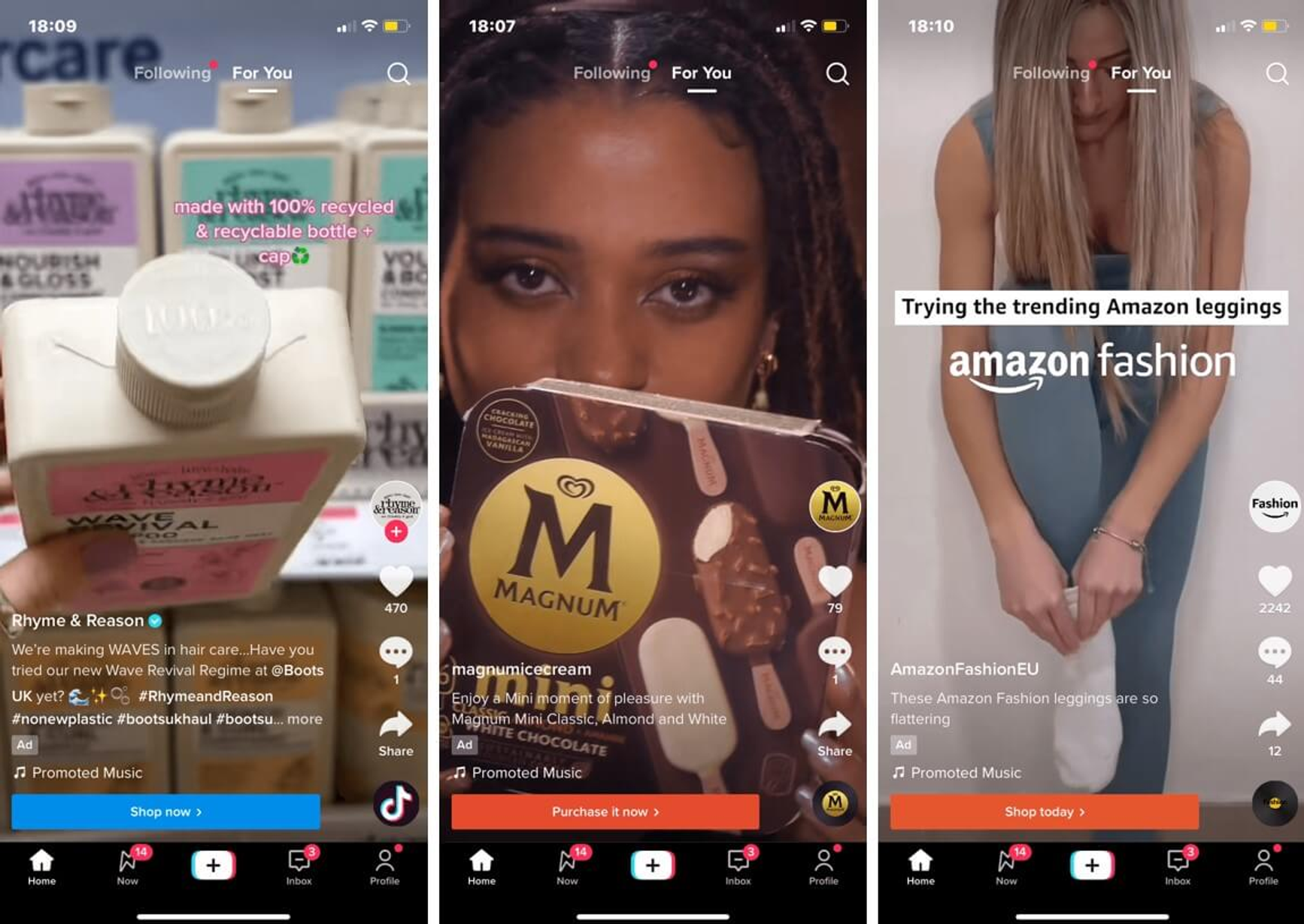
In-feed ads are video ads that play on the user's "For You" page. It's the most native video ad format, and users can like and comment on the video ads for everyone to see. Each ad also has a dedicated call-to-action (CTA) button that sends viewers to your landing page.
Here are the TikTok video ad specs you must meet:
- Aspect ratio: 9:16 vertical (at least 540x960 px), 16:9 horizontal (at least 960x540 px), or 1:1 square (at least 640x640 px)
- Resolution: Export at 1080x1920 px for sharper video
- Video length: Up to 10 minutes (15 to 20 seconds recommended for engagement)
- File size: Maximum 500 MB
- File types: MP4, MOV, MPEG, 3GP, and AVI
Spark Ads requirements and authorization
Spark Ads boost a post that’s already on TikTok. The ad runs from that post, so the video and the caption come from the post, not the Ads Manager. That’s why Spark Ads follows different caption rules than non-Spark ads.
To run a creator’s post, you need their permission. Here’s how that works:
- Ask the creator to open the video in TikTok and go to Ad settings.
- Tap Generate to make a post authorization code.
- Paste the code into Ads Manager to authorize the post.
The best ad specs for Spark Ads are:
- File type: MP4 or MOV
- Caption: Up to four lines shown. Emojis count toward those lines.
- Length: TikTok’s In-Feed page doesn’t list a time limit. But its Spark Ads overview says 10 minutes. Plan for 10 minutes and under just to be safe.
TopView
TopView is the first ad many people see when they open TikTok. It starts with a three-second full-screen takeover, then moves into the regular feed. Because it’s full screen, your text needs to fit inside the TopView safe zone.
- Aspect ratio: 9:16 vertical, at least 540x960 px
- Video length: 5 to 60 seconds. TikTok recommends 9 to 15 seconds.
- File size: 500 MB or less
- Bitrate: At least 2,500 kbps
- File types: MP4, MOV, MPEG, or 3GP
Carousel (image) ads
TikTok’s multi-image post format is called Carousel. These are the ad specs for a standard TikTok carousel ad:
- Images: 2 to 35 JPG, JPEG, or PNG files
- Sizes: 1200x628 px (horizontal), 640x640 px (square), or 720x1280 px (vertical)
- File size: TikTok suggests 100 KB or less per image
- Extras: Music is required. All images have a caption, CTA, and URL.
TikTok also has a catalog-based carousel with different link rules. Check the Help page if you sell from a product feed. Shopping and other commerce formats also have their own spec pages, and they can vary by region and account.
Captions, text and safe zones
Your video can meet every size and length rule and still lose viewers. TikTok places its own buttons, your caption, and your profile name over part of the video, and any text under them is hidden. This section shows how much text you can write for each ad type, and where on the screen to place it.
What is the TikTok ad copy character limit?
The limit for TikTok ad copy differs from regular TikTok posts and changes by ad type. Here’s what each one allows:
- Non-Spark ads: TikTok’s ad creation API sets ad text at 100 characters. The In-Feed help page also suggests keeping English text within 100 characters so it isn’t cut off with “See more.” Non-Spark captions can’t include clickable links, @ symbols, or hashtags.
- Spark Ads: The caption comes from the original post. Up to four lines show, emojis included.
If you want to be exact with your character limit, test your text in Ads Manager’s preview.
How do safe zones work?
A TikTok safe zone is the area of your video where text and logos stay fully visible. When your ad plays, TikTok shows buttons (like Like and Share), your caption, and your profile name on the top of the video. Any text under those items gets covered. Keep your logo, offer, and subtitles in the safe zone, and viewers can read every word before they scroll.
How big is the safe zone? It changes with your aspect ratio, caption length, and whether your ad has an anchor. TikTok’s own templates show the exact area. Pick the one that fits your ad:
- In-Feed ads: Download the In-Feed Standard Version LTR.zip from the In-Feed specs page
- US ads with an anchor: Use In-Feed with Anchor Standard LTR from the same page
- TopView: Download the TopView safe zones .zip from the TopView specs page. It covers both the opening screen and the In-Feed stage.
Before you hit publish, preview on your phone. Screens differ, so the live ad can look a little different from the preview.
How to do creative QA before you upload
Before you upload your TikTok ad, check that your creative meets the TikTok ad specs for file type, size, length, and safe zone. These six checks take about five minutes and help you avoid a rejected ad, hidden text, or a link that goes to the wrong page.
- Watch it like a viewer. Play the video in 9:16 on a real phone. Make sure nothing is cropped.
- Check the file. Confirm the file type, a size under 500 MB, and the right bitrate for your format.
- Protect your message. Move your logo, offer, and subtitles inside the safe zone.
- Clear the music. Confirm you have the rights to every song and sound in the ad.
- Click your own link. Open your destination URL and check that it lands on the right page.
- Take a final look. Preview the ad in Ads Manager, then check your CTA and text overlays one more time.
Once your ad passes, you can start testing it. Compare different hooks, offers, and messages, then keep the versions that perform best and build on them.
Best practices for TikTok ads
A file that meets every TikTok ad spec can still get ignored. These seven practices follow your ad from the first frame to the refresh. Each one comes from TikTok’s own guidance.
- Shoot vertical, sharp, and inside the safe zone. Film in 9:16 at 720p or higher so the ad fills the screen. Keep key content inside the safe zone so buttons and captions don’t cover it.
- Hook viewers fast. Introduce your message in the first 3 seconds, and make the hook the focus of the first 6. Viewers who scroll past never see the rest.
- Add sound and captions. Use music, a voiceover, or someone talking to the camera, and add captions so viewers can follow along. In a 2021 analysis, TikTok found that 93% of top-performing videos use audio. That shows what top videos have in common.
- Follow a simple story: hook, selling points, and call to action. After the hook, show why your product is worth buying. Then end with a clear call to action (CTA), such as “Shop now.” TikTok suggests showing the CTA on screen and saying it in the voiceover.
- Match your length to the placement. TikTok recommends 21 to 34 seconds for In-Feed ads and 9 to 15 seconds for TopView ads.
- Test 3 to 5 very different creatives in each ad group. Change the hook, the visuals, and the CTA, not just one word. Compare results and keep the winner.
- Add fresh creatives when results drop. If results keep falling, add new creatives to the same ad group instead of starting a new one.
Your next step
Your next TikTok ad doesn’t have to get stuck in review or lose its offer behind a button. Pick a format, export one 9:16 MP4, check it against the safe zone, and upload it.
Once the ad is live, the question changes from “Is it valid?” to “Is it working?” Connect TikTok to Triple Whale and see it next to every other channel.
Book a demo or get started with a free account today.
TikTok ad specs: FAQs
Which size should a TikTok ad be?
For a Non-Spark In-Feed video, use 9:16 at 540x960 px or larger. Most teams export at 1080x1920 for sharper video. TikTok also accepts 16:9 (at least 960x540) and 1:1 (at least 640x640).
Which video formats are supported?
Non-Spark In-Feed ads accept MP4, MOV, MPEG, 3GP, and AVI. TopView accepts MP4, MOV, MPEG, and 3GP. Spark Ads use MP4 or MOV. MP4 works for all three.
How long can Non-Spark ads be?
Non-Spark In-Feed videos can run up to 10 minutes. TopView runs 5 to 60 seconds.
How long can a TikTok ad be?
Most TikTok ads can be up to 10 minutes. But a good rule of thumb is to keep them between 15-20 seconds, as those perform best.
Can I use music in TikTok ads?
Yes, but you need commercial usage rights or TikTok’s Commercial Music Library.
Are emojis allowed in TikTok ads?
Emojis are allowed in captions, but not in the brand name field.