Imagine a shopper looking for a rain jacket for a weekend hike. They click an ad for an outdoor clothing store, compare two jackets, and add one to their cart.
At checkout, they look for a delivery date to make sure the jacket will arrive before their trip. There’s a shipping price, but no estimate of when to expect the order. After searching for answers, they get frustrated and leave the site to shop elsewhere.
A customer journey map shows the steps someone takes with your store, from clicking on an ad to choosing a product and checking out. It helps you look at that experience from the shopper’s point of view and spot problems that could make them leave. Mapping that journey helps you choose what to fix so more shoppers add products to their carts and complete checkout.
This guide explores different types of customer journey maps and walks you through five steps to create your own.
Key Takeaways
- A customer journey map outlines the shopping experience from your customer’s point of view.
- The three main types of customer journey maps are current state (today’s experience), future state (the ideal experience), and day-in-the-life (the customer’s daily activities).
- Include each step of the buying process, customer actions and feelings, touchpoints, pain points, and possible improvements.
What is a customer journey map?
A customer journey map shows how a group of people moves through an experience with your brand. It tracks what they do, what they need, how they feel, and what gets in their way. Each point of contact with your brand is called a touchpoint.
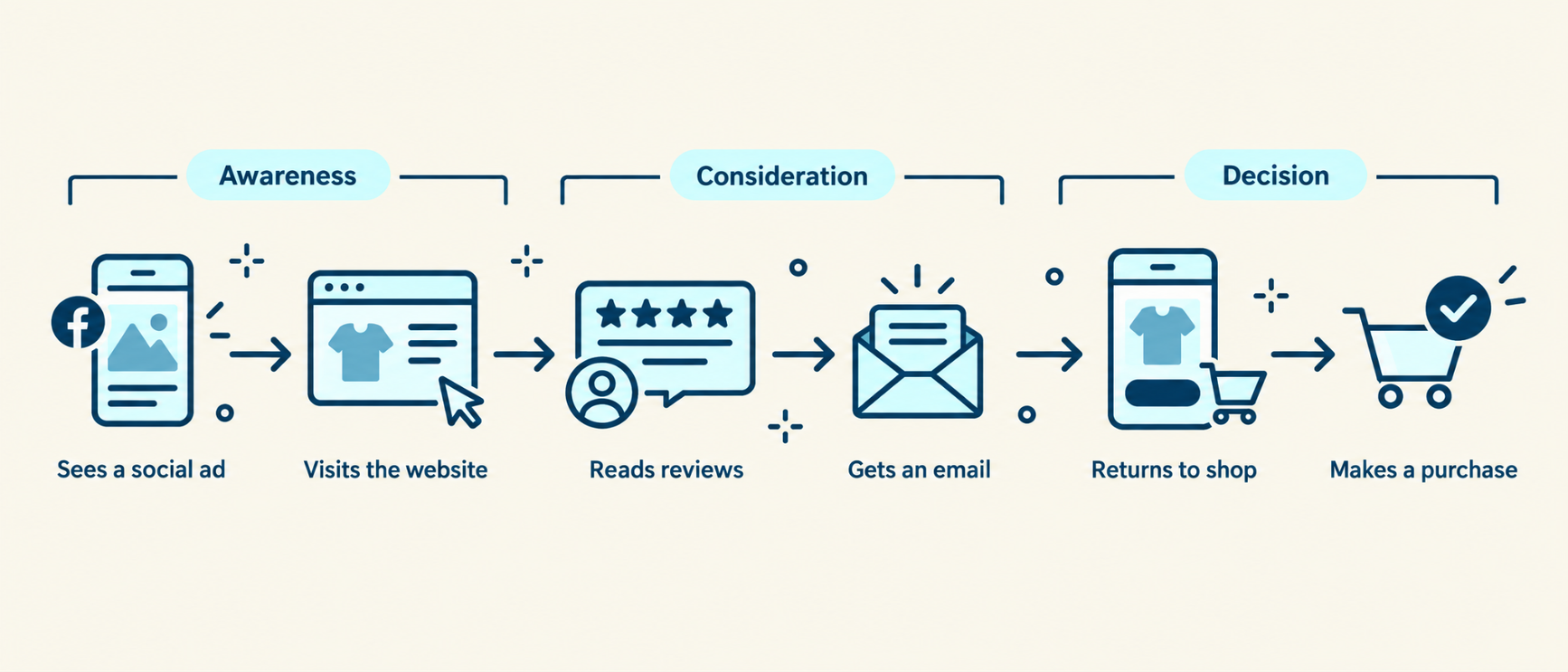
A marketing funnel groups the steps that lead to a sale or another goal. A journey map adds what shoppers experience at those steps. It can show pauses, repeat visits, and what happens after a sale. For example, someone may see a product on social media, compare it to another site, and return through email.
Here are three types of customer journey maps:
Current state mapping
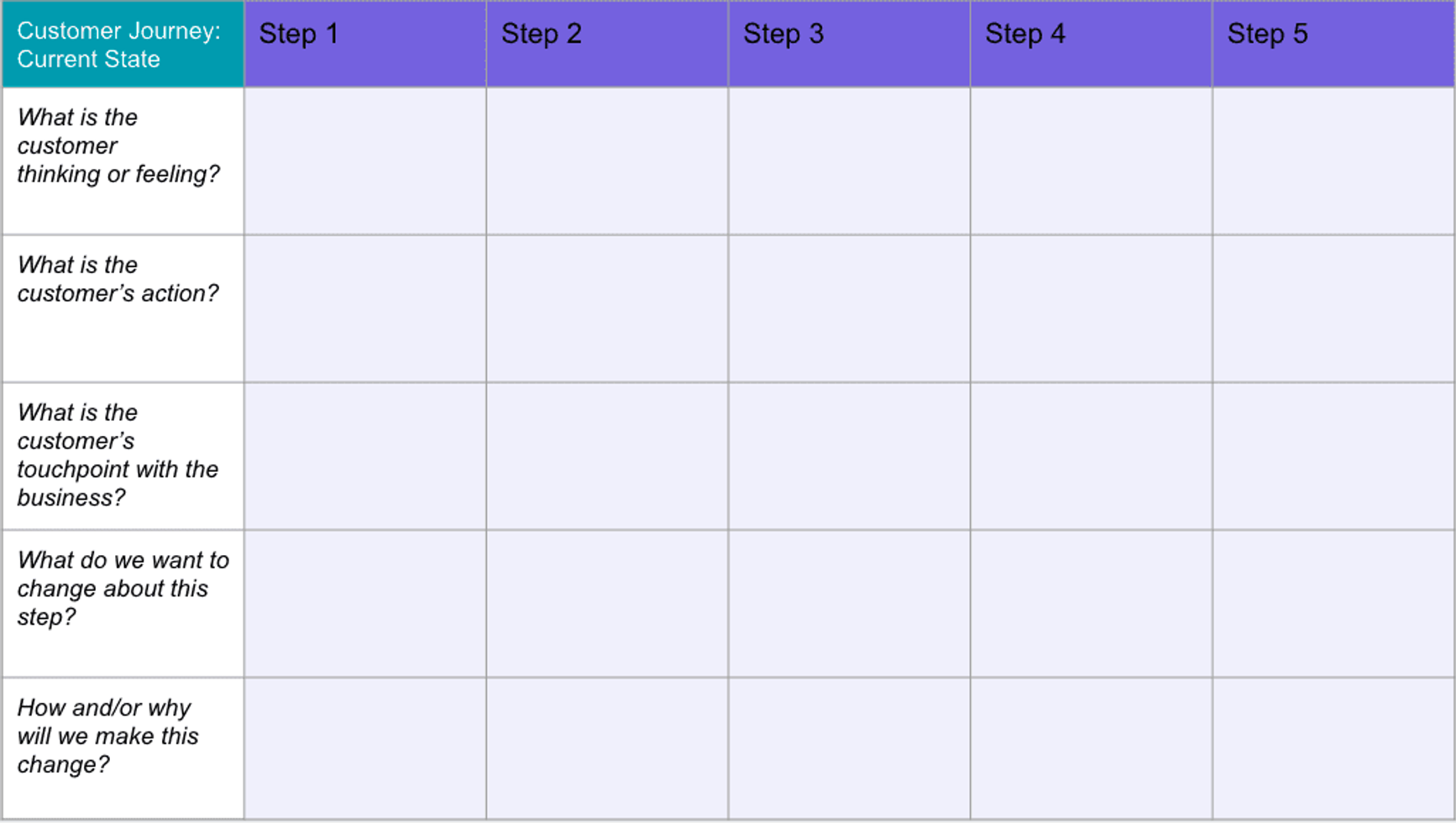
The most commonly used journey map format, current state maps help you visualize the actions your customers presently undertake and the emotions they experience while engaging with your ecommerce brand.
Here's what they look like:
Future state mapping
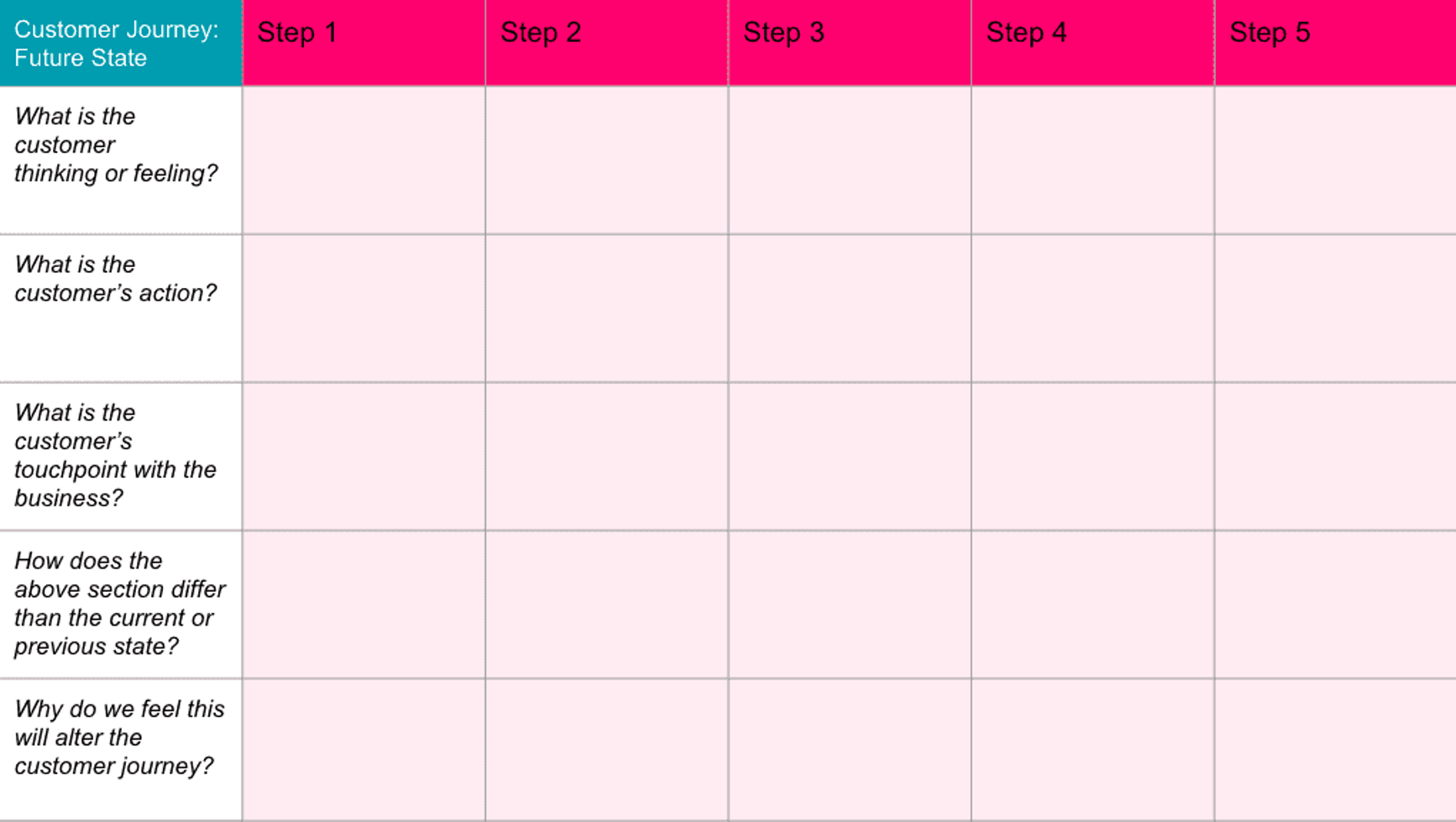
Once you have a current state map, you can consider visualizing what an ideal customer journey would look like if you filled the gaps at suboptimal customer touchpoints. Unlike current state maps, future state maps are focused on your business’s vision and long-term strategic goals.
Here's what they look like:
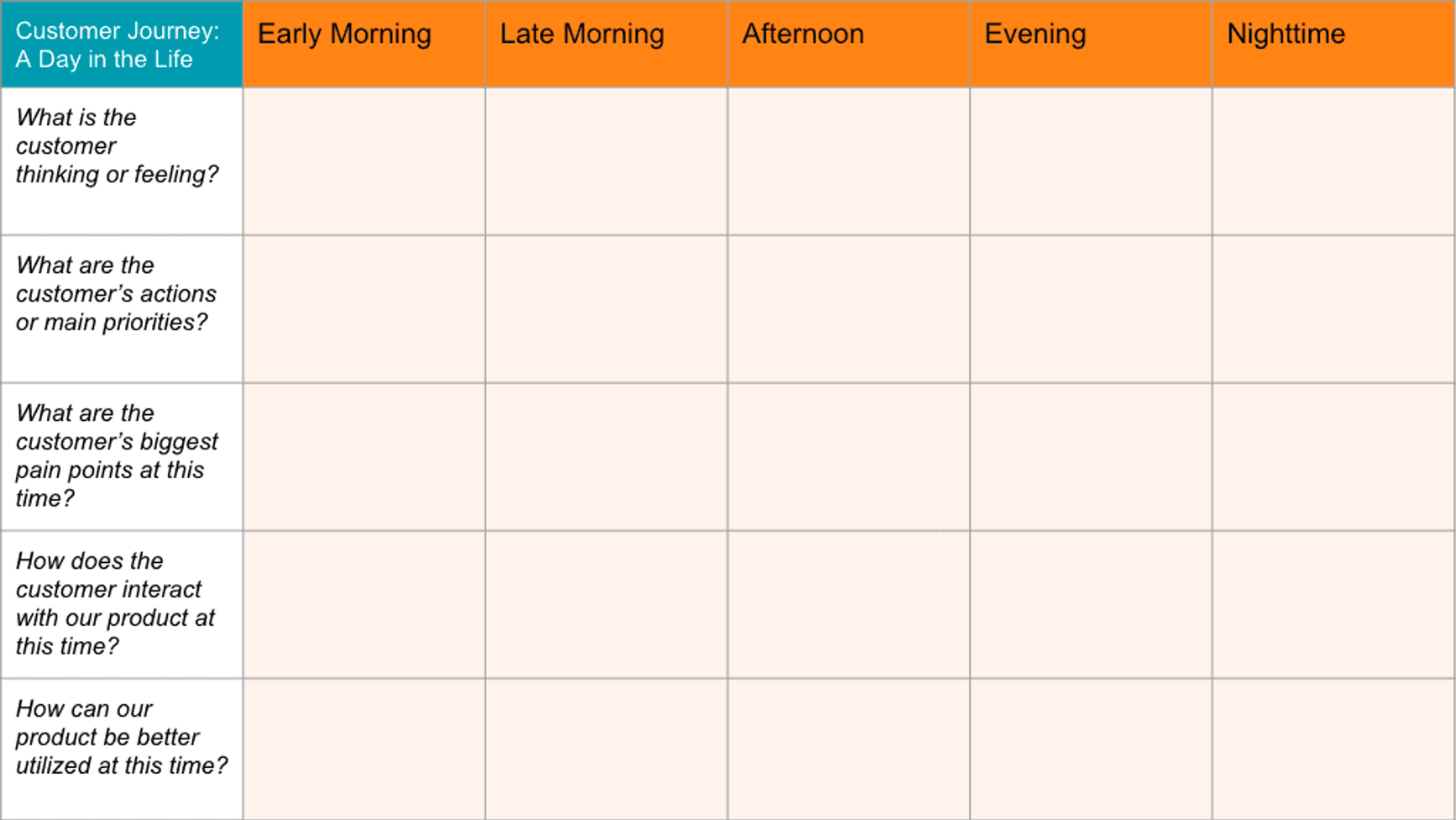
Day in the life mapping
This journey map gives you a chronological visual representation of the customer’s journey in their day-to-day activities (with or without your company’s involvement). These maps can help identify unmet customer needs and fuel new marketing campaigns.
Here's what they look like:
Why create a customer journey map?
Customers can get mixed messages when your marketing, ecommerce, and support teams don’t coordinate. An ad may promise a quick order, but the product page doesn’t say when it’ll arrive. Support may solve a problem, but the next email acts as if it never happened.
A shared map helps marketing, ecommerce, and support teams find these gaps and agree on a fix. It can help you:
- Better understand how customers feel about your brand and what they expect
- Boost customer engagement with messages that fit each stage and need
- Remove extra steps or make confusing ones clear
- Tailor your marketing campaigns to specific buyer personas
- Make it clear who owns each step when work moves between teams
- Find problems after a sale that may hurt customer retention or the ability to keep buyers coming back
The map helps your team decide what to try. You still need to measure whether each fix leads to more sales or repeat orders.
Setting the stage for a converting customer journey map
Building a successful, converting customer journey map starts with clear objectives aligned with your marketing goals. Think of these objectives like the destination you type into your GPS; without it, you wouldn't know which direction to drive.
Your goals may range from increasing customer retention and driving repeat purchases to boosting average order value (AOV) or simply enhancing the overall customer experience.
Set SMART goals
Before you start mapping, set SMART goals: Specific, Measurable, Achievable, Relevant, and Time-bound. These goals guide your journey mapping and directly influence its design and outcomes.
- Specific: Your goals should be straight to the point and clear. Instead of saying, “I want to enhance the customer experience,” try, "I want to reduce customer queries about product usage by 15% by improving the product description and FAQ section on the website."
- Measurable: A measurable goal could be, "Increase customer retention rate by 20% in the next quarter." This gives you a clear target and lets you measure progress with concrete data.
- Achievable: Make sure your goals are within reach considering your resources. If you're a small online bookstore, you can't expect to outdo Amazon in terms of sales in a year. An achievable goal might be to "Increase quarterly sales by 10%."
- Relevant: Ensure your goals align with your overall business strategy. If your focus is on customer acquisition, your goal might be to "Increase website traffic by 15% in the next two months."
- Time-bound: Give goals a timeline to create urgency and motivate your team. An example of a time-bound goal could be, "Decrease shopping cart abandonment rate by 25% in the next six months."
A well-defined SMART goal doesn't just provide direction; it gives you a concrete measure of success. It becomes your yardstick to measure the effectiveness of your customer journey map. If the objective is to increase customer engagement, for instance, you'll be monitoring actions like email open rates, click-through rates, and time spent on your website.
Aligning objectives with your marketing goals also ensures every step of the customer journey is purposeful and valuable. It lets you create touchpoints that guide customers toward actions aligned with those goals.
How to conduct comprehensive research for informed mapping
Before you draw your map, you need to do your research. Understanding your customers is the heart and soul of creating a customer journey map.
You’ve got a few tools at your disposal to help you get the job done. Customer surveys and feedback forms, such as post-purchase surveys, are like your trusty magnifying glass, bringing the details into focus.
Then, you have your analytics platforms. Use customer journey analytics to see how people move through your site and marketing channels. Pair those findings with customer feedback to understand why they take those paths.
Don’t forget about your sales and customer service teams. They can share insights into customers’ wants, needs, and expectations. And of course, social media can be a goldmine of information, offering unfiltered commentary on what your customers love and dislike about your brand.
Combine these sources to get a fuller view of your customers. Look for patterns and trends. Once you’ve gathered the evidence, you can start to map the journey.
How to craft personas for targeted journey maps
Detailed customer personas describe groups with distinct needs, preferences, and buying habits. These personas play a crucial role in developing more personalized, targeted customer journey maps. They help you understand who your customers are, what they want, and how they interact with your brand.
Build these personas from your research data rather than guesses about who your customer is.
Detailing customer segments and behaviors
Start by segmenting your customers based on demographics like age, location, and income. Then, dig deeper. Look at behavioral data like purchase history, browsing habits, and customer feedback. What products do they gravitate towards? Do they abandon their shopping cart often? What complaints or compliments do they have?
Next, try to understand their psychographics: their interests, values, and attitudes. Social media can be a treasure trove for this. Do they engage with sustainability content on Instagram? Are they leaving rave reviews for tech-savvy products?
Finally, bind all these insights together to create distinct customer personas. Each persona should tell a story, capturing the essence of a segment of your audience. Remember, these personas aren’t static. They should evolve as you continue learning about your customers.
By knowing your customers well, you can design a journey map that fits their needs.
For repeat-purchase maps, RFM segmentation groups customers by how recently they bought, how often they buy, and how much they spend.
How to outline key stages and milestones
The customer lifecycle journey isn't a straight line. It's more like a winding road with a few pit stops along the way.
- Awareness: It's when potential customers first stumble upon your brand, whether through social media, search engines, or word-of-mouth recommendation.
- Consideration: They're checking out your products, comparing them to competitors, and reading reviews. Position your brand as the rock star solution to their needs.
- Purchase: The customer decides you're the best fit for them and makes a purchase. But remember, a sale isn’t just a transaction; it's the start of a relationship.
- Retention: You’ve got to keep your customers engaged with email campaigns, personalized offers, and stellar customer service. The goal is to turn a one-off purchase into a repeat visit.
- Loyalty: Your customers are now your biggest fans. They keep coming back, they're raving about you to their friends, and they're even defending your brand in the comments section.
Next, find the key milestones in the journey. These are key actions or behaviors that signal a potential conversion.
For example, when a customer signs up for your newsletter, adds an item to their cart, or even spends a certain amount of time on your website. Recognizing these milestones helps you intervene at the right time with the right message, helping them move toward a purchase.
What does a customer journey map include?
Before you dive headfirst into creating your eCommerce customer journey map, you need to gather intel about your potential and existing customers.
Here are a few things you might add to your customer journey map:
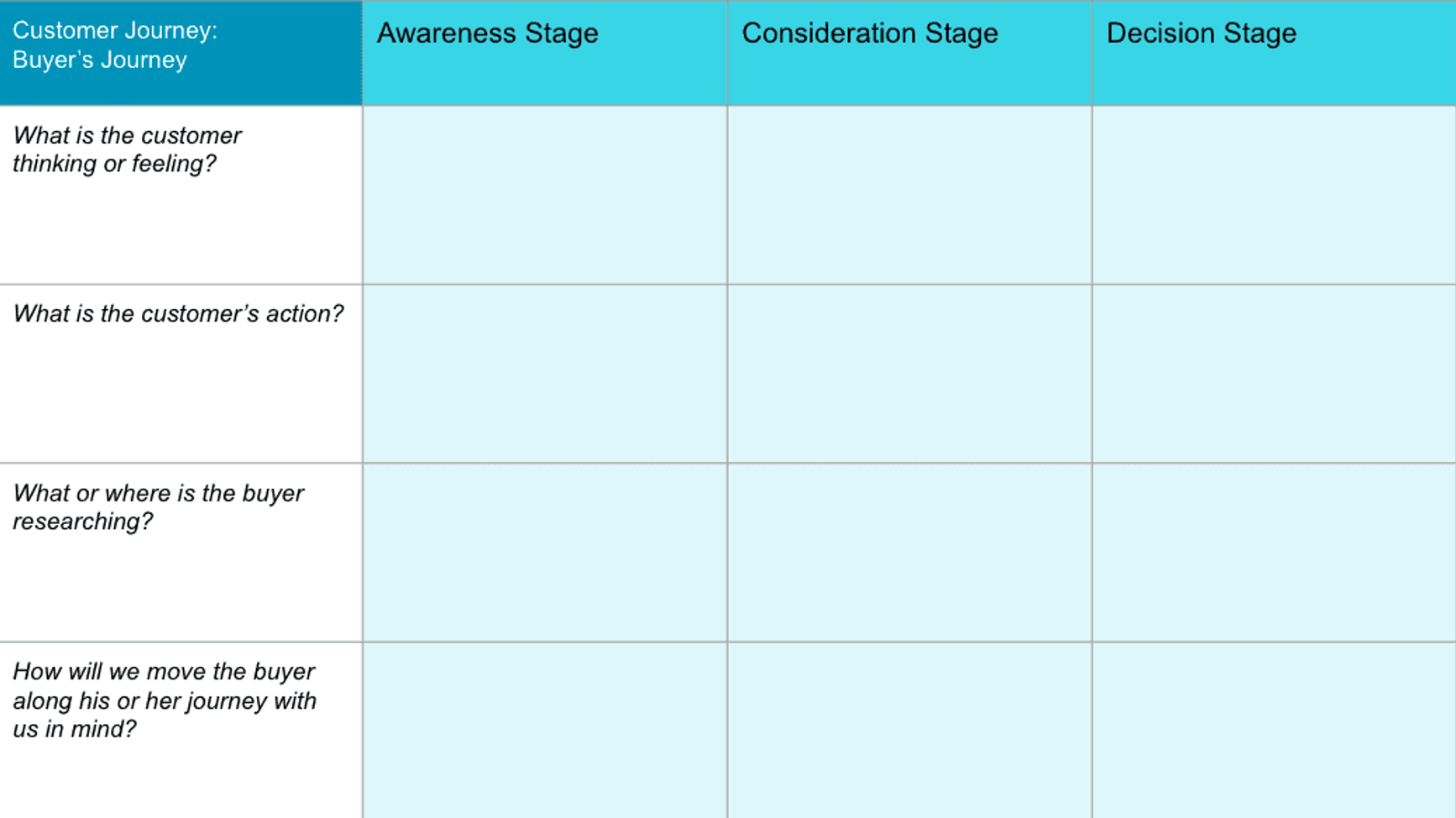
- The buying process. The typical path you intend your customers to take to reach their goals, including all the major milestones in the customer journey (such as Facebook ads, your Amazon listing, etc.)
- Customer actions. What does the customer do at every stage of their journey? They may check product reviews, get a friend’s opinion, save products to their wishlist, etc. Add these various actions to your map.
- Emotions. Customers may feel emotions such as excitement or anxiety, and adding these to your map can help reduce negative feelings about your brand.
- Pain points. These are issues or inconveniences that stir negative emotions in customers. Including these helps you identify where in the funnel things are going wrong and why.
- Solutions. Some potential ways to improve your buying process so customers can easily find what they want and check out smoothly.
Include the relevant touchpoints in your map. These are moments when customers form an opinion of your business. They can reveal ways to improve the buyer’s journey.
How to create a customer journey map
Now that you understand the what and why of customer journey mapping, let’s dive into the steps for creating a useful customer journey map.
Step 1. Set a goal for your map
What is the exact purpose of your map? Without a clear objective, it may not tangibly impact your customer experience or bottom line.
Find the audience segment you’re mapping the journey for. Don’t group too many segments into one. Be specific about who you’re creating the map for.
Work with customer-facing team members who touch different parts of the customer experience, such as social media marketers and customer service reps. To set a SMART goal, gather their views and insights on different parts of your current customer journey, where you can improve, and how you will measure those improvements.
Based on this, build a buyer persona: a customer profile based on research with relevant demographics, interests, and buying habits. A clear persona helps you align every aspect of your journey map with your customers. To create an accurate persona, the next step is to…
Step 2. Ask customers about their buying journey and motivations
What better way to learn about your customers than to profile them directly?
Here are some methods and sources to get insights from your current and prospective customers:
- Questionnaires
- Website user testing
- NPS email surveys (post-purchase and newsletter subscribers)
- Customer interviews
- Social media polls
- Customer support data logs
- On-site user behavior and analytics (using tools like Hotjar and Google Analytics)
And here are a few valuable questions you can ask:
- How did you get to know about our brand?
- How easy or difficult did you find our website to use?
- Did you face any issues in the checkout?
- What was the deciding factor for your purchase?
- Did we help you achieve your goal?
- Did you require customer support? If yes, on a scale of 1 to 10, how helpful was it?
- Any suggestions for us to make your shopping experience better?
Bring these customer stories and data points together in the buyer persona you build.
Step 3. Ask salespeople and customer service reps about customer pain points
While your customers are the best source of input for your journey map, they may not be aware of their exact pain points.
They might feel something is missing or isn’t quite right, but can't pinpoint exactly what’s not working for them.
In such cases, consult your salespeople and customer service reps. They can translate customers’ vague descriptions into actionable information you can understand and act on. Your customer support team can also share specific instances of customers reporting unique or one-off issues that you can factor into your journey map.
Step 4. Map out buyer touchpoints
As mentioned earlier, buyer touchpoints are all the places customers engage with your brand — website, social media, paid ads, email marketing, business review platforms, phone calls.
Listing the touchpoints relevant to your chosen customer group is a key step. It gives you insight into the actions your customers take.
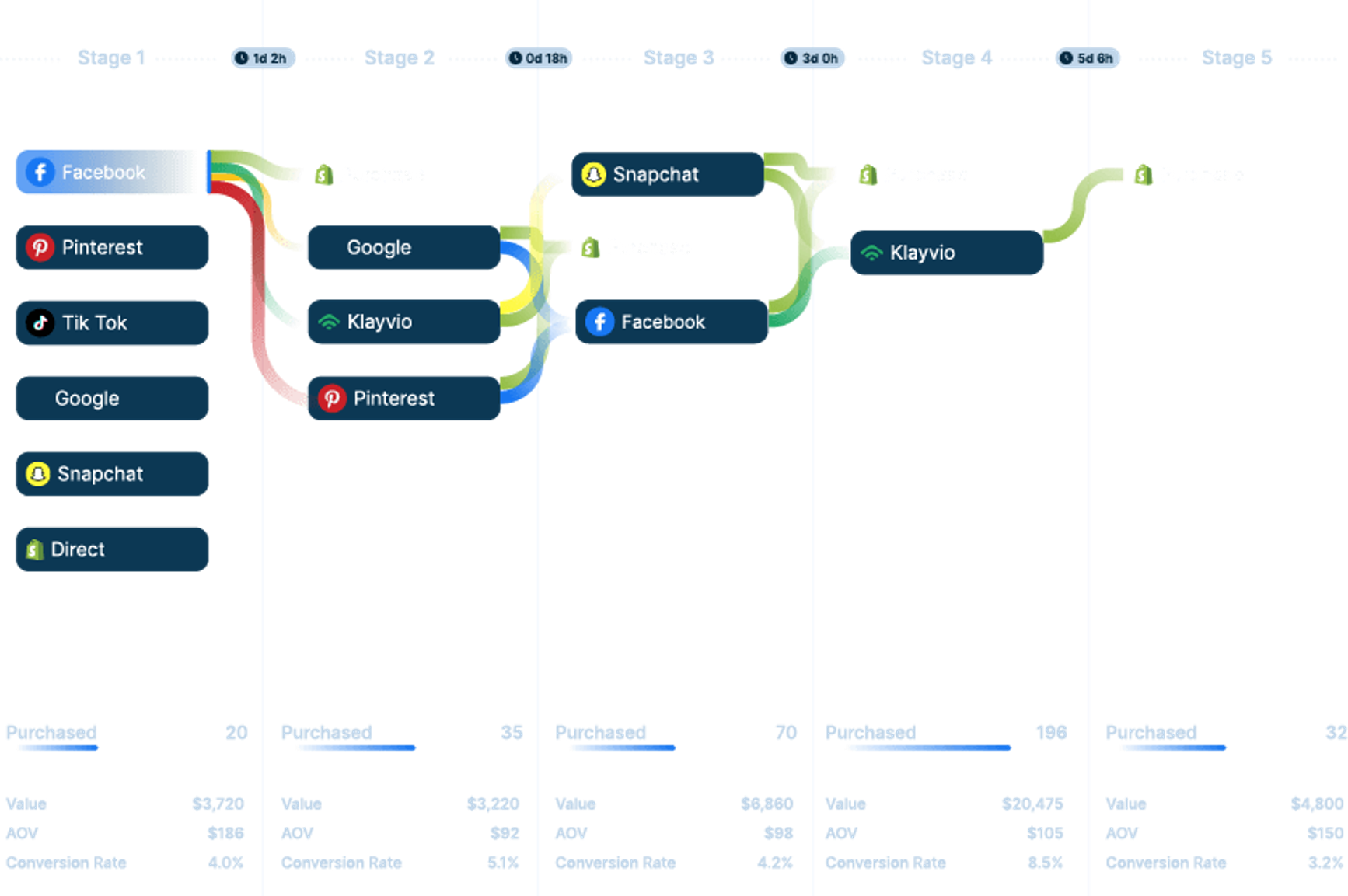
To do this, look at your business from the customer’s perspective and walk yourself through their journey step by step. Include all the things (actions, obstacles, emotions) touched upon earlier.
Now, organize all the data you've gathered about your customers into a visual, such as a table, timeline, or fishbone diagram. Any format is fine, as long as you include all the customer touchpoints, actions, roadblocks, emotions, channels, and the assigned ownership of a touchpoint (marketing, sales, design, customer service, etc.).
Example: Connecting touch points in a HubSpot customer journey
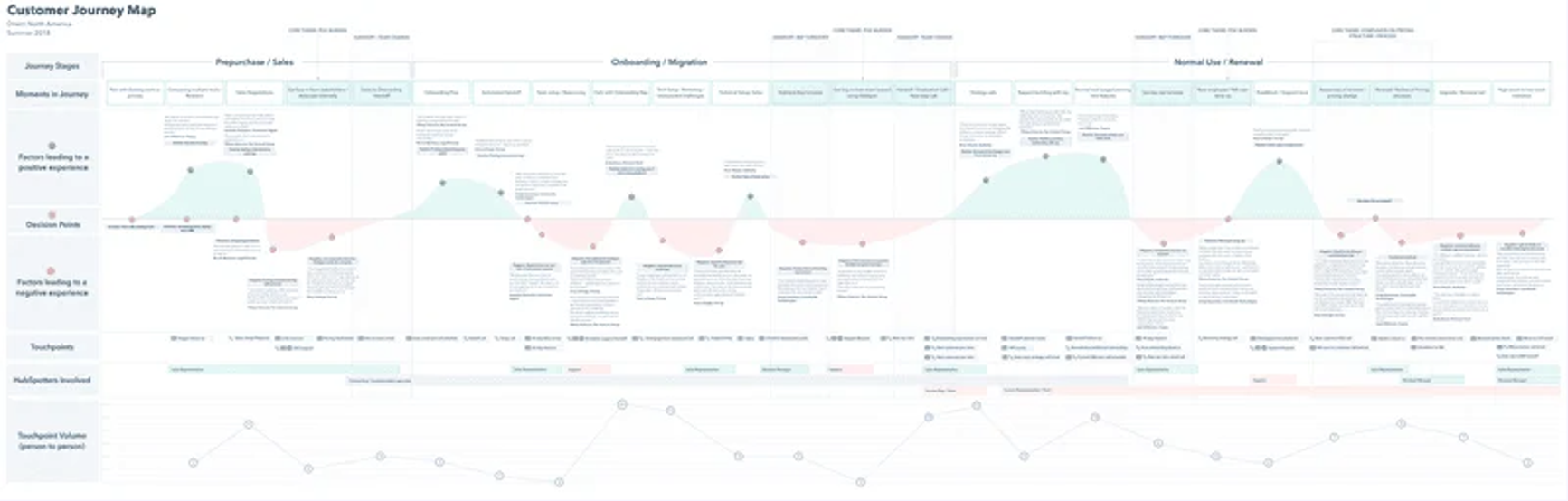
Source: Userpilot
What makes someone start looking for a new tool? Often, something about their current one isn’t working for them. That’s where the HubSpot journey map featured by Userpilot begins. It follows a dissatisfied customer as they search for a solution, discover HubSpot, and become a paying customer. Along the way, it connects their interactions with the people and internal work supporting each step.
Try looking at your store through that same lens. Imagine a shopper who needs a waterproof jacket for an upcoming hike. They click your ad, find a jacket they like, and open the size guide. Then they pause: they’re between sizes and can’t tell which to choose. Your map should capture that question alongside the visit to the product page.
If customer feedback confirms that others struggle with the same question, you have a problem to investigate. Record it beside the size-guide touchpoint, name the person who will update the guidance, and test whether the change helps shoppers choose a size. You’ve connected a moment of hesitation to work your team can act on.
Step 5. Evaluate and adjust your map based on customer feedback
With the customer journey map ready, the final step is to analyze it to identify gaps in the journey, weak transitions between funnel stages, and key pain points to prioritize.
Take note of all the resources that go into creating the customer experience, such as CRM software, chatbots, customer service tools, etc. This will help determine whether you need to invest in additional tools, such as a profitable A/B testing program, or find better alternatives to existing ones to help your teams improve the customer journey.
Present your map’s analysis to all relevant teams to bring everyone onto the same page about the areas that need to be improved and how each member will play a part in enhancing the customer journey.
For example, you could have your developers improve the website (such as boosting page load speed or simplifying navigation), marketers write longer product descriptions for better clarity, or customer support reps respond faster to customer inquiries on social media.
No matter how big or small the changes are, they’re almost certain to be fruitful because they are driven by customer data and pain points.
Lastly, creating a customer journey map isn’t a one-and-done task. Your customers’ expectations are constantly evolving. You’re likely introducing new products to your eCommerce store. So review and test your customer journey map every quarter or six months to spot gaps and opportunities to refine it further.
How to validate and refine your journey map
Once your customer journey map is in place, it's time to bring in the real players - your customers. Testing your journey map with real customers gives you a more realistic view of how well it aligns with their needs and preferences. This can involve walking them through the map, asking for their feedback, or having them interact with your brand while you observe and take notes.
You can use a range of methods to test your map. You can send surveys and questionnaires to a broad customer base and ask them about their experience at each touchpoint. User testing is another useful method where you observe how customers interact with your brand during their journey. This could involve tasks like navigating your website, purchasing a product, or contacting customer support. The goal is to identify any friction points or moments of delight that might not have been captured in your initial map.
Refining and iterating your journey map
After the testing stage, you'll have a wealth of feedback and observations to work with. Now it's time to refine your map. This might involve removing unnecessary steps that cause friction, adding touchpoints that customers find meaningful, or adjusting the journey to better match customer behavior.
Remember, refining your map isn't a one-time task, but rather an ongoing process. As customer behaviors and expectations evolve, your journey map should too. Regularly review the map and make adjustments based on new customer insights or changes in your business. This keeps your map useful and reflects what customers experience. You can use what you learn to plan more improvements. Even small changes are worth testing.
Customer retention analysis and cohort analysis can help you check whether those changes lead to more repeat purchases.
How to use your journey map in marketing
You can use this tool to identify key opportunities to improve your marketing strategies. For example, look for touchpoints where customers may drop off. It might be time to test your ad targeting or content at that stage.
Integrating the map into marketing campaigns
Suppose your customer journey map shows that customers often pause before purchasing to seek more information about your products. In that case, this is your cue to create enriched content that answers their questions and eases their doubts. This could be in the form of detailed product descriptions, informative blog posts, or engaging video content.
If your map shows that a customer group responds well to certain marketing channels, use that insight to guide your next test. For instance, strong engagement on Instagram could be a reason to test a campaign there. Check sales and customer outcomes before deciding to spend more.
Overall, the customer journey map gives your marketing a clear framework. It helps you decide what content to produce and where to test campaigns. You can use it to connect with your audience at each stage of their journey.
Common mistakes and fixes
A customer journey map should help your team decide what to improve and why. These common mistakes can make that harder, even when the map itself looks complete.
Don’t put too many customer groups on one map
First-time shoppers may need reviews, sizing advice, and return details before they feel ready to buy. Repeat customers may already know what they want and need a quick way to reorder. Combining those experiences can hide the obstacles that matter to each group.
Start with one customer group and a specific task, such as a first-time visitor choosing a product and completing a purchase. Define where that journey begins and ends to keep the scope manageable.
Create separate maps when customers need different information or follow different buying steps. A demographic difference alone doesn’t call for another map. What matters is whether it changes the shopping experience or the fix your team should make.
Don’t list touch points without owners
“Improve the product page” gives your team a topic, but little direction. A useful action identifies the problem, assigns someone to address it, and defines how you’ll judge the result.
For example, if shoppers struggle to find sizing information, ask one person to lead a test of a more visible size guide. Other teammates can contribute, but that owner should coordinate the work and report back.
Alongside the task, record:
- The change you plan to test
- A measurable goal and the current result as a baseline
- A review date
Choose a measure that fits the problem, such as the number of size-related support questions. When you review the results, decide whether to keep, adjust, or remove the change, then add what you learned to the map.
Don’t skip customer interviews
A checkout exit won’t tell you whether someone disliked the shipping cost, needed an earlier delivery date, or was browsing without plans to buy. Analytics can help you find the point worth investigating. Customer conversations help explain what happened there.
Speak with people in the group you’re mapping, including recent buyers and, where possible, shoppers who left without purchasing. Ask about a specific, recent visit so they can describe what they actually did:
- What were you looking for?
- What information did you need before deciding?
- Where did you feel unsure about continuing?
- What helped you buy, or what made you leave?
Keep the questions open. “Were shipping costs too high?” suggests an answer; “What did you think when you reached checkout?” leaves room for something you hadn’t considered.
Compare those conversations with survey responses, support questions, and the behavior in your analytics. Look for recurring concerns before choosing a fix, and mark any explanation you haven’t confirmed as an assumption.
Keeping your customer journey map current
In the constantly changing business landscape, your customer journey map must stay fresh. It should evolve alongside your customers and your market. When should you update it?
First, major market changes should prompt a review. A shift in consumer behavior, a new competitor, or changes in how people shop may mean your map needs another look.
Secondly, pay attention to your customers' feedback. If you're hearing recurring comments or complaints about a specific stage in the journey, go take a closer look.
And lastly, new product launches should trigger a journey map update. New products might attract different customer segments or change the way your existing customers interact with your brand. So make sure your journey map reflects these changes.
Learn more about your customers with Triple Whale
The better you know your customers, including their pain points, emotions, desires, and needs, the better you can sell to them.
By shifting your focus to the customer’s point of view, you can create a more compelling and satisfying customer experience. A customer journey map also helps you find ways to improve engagement and your team’s work. Use it to guide efforts to improve customer acquisition cost (CAC), advertising return on investment, and conversion rate.
Triple Whale connects first-party customer data with marketing touchpoints. Triple Pixel tracks on-site activity and tracked marketing touchpoints. It starts collecting data when it’s installed, and reliable channel details depend on correct tracking parameters.
Moby, Triple Whale’s AI teammate for commerce, helps you explore customer behavior and marketing performance by asking questions in plain English. Use it to compare customer groups, investigate trends, and turn your data into reports that inform your journey map. Pair those findings with customer feedback to decide what to improve next.
Book a demo to see how Moby can help you put your data to work.
Customer journey mapping: FAQs
What is a customer journey map?
A customer journey map is a visual representation of a customer's overall experience with your ecommerce brand. It helps you see your business through the customer's eyes as they move through the different stages of your sales funnel.
What are the main types of customer journey maps?
The three main types are current state maps (what customers do and feel right now), future state maps (what an ideal journey would look like), and day-in-the-life maps (a chronological view of the customer's daily activities with or without your brand's involvement).
What should a customer journey map include?
A solid map should capture the buying process, customer actions at each stage, emotions, pain points, and potential solutions. Including as many touchpoints as possible helps uncover more opportunities to improve the buyer's journey.